


HMIS Newsletter: February 2026


Announcements


Southern Nevada Coordinated Entry YOUTH Assessment Update

Beginning February 17, 2026, assessors will see a new alert at the top of the Housing Assessment in the Coordinated Entry system.
This alert is designed to support consistent, youth-appropriate assessment and will prompt assessors to use the Southern Nevada Youth Assessment (SN Youth Assessment) when working with any community member age 25 or younger.

What this means
  • All youth and young adults (age 25 and under) should be assessed using the SN Youth Assessment
  • The Youth Assessment is tailored to be more developmentally appropriate, trauma-informed, and youth-centered
  • It helps connect young people to youth-specific resources, housing pathways, and supports that may not be available through the adult system

What should assessors do?
When the alert appears:
1. Confirm the person’s age
2. If 25 or younger, complete the SN Youth Assessment instead of the adult Housing Assessment
3. Explain the difference between the youth and adult systems so the young person can make an informed choice

This update helps us:
Provide age-appropriate, strengths-based engagement
  • Improve access to youth-specific housing and services
  • Ensure more equitable and consistent system practices
  • Reduce the need for re-assessment later

Current Living Situation Tab Update (HPS Documentation Change)

There will also be a change to the Current Living Situation tab within the Coordinated Entry screens.
  • HPS (Housing Problem Solving / Prevention & Diversion) questions will no longer appear in this tab
  • All Housing Problem-Solving conversations and outcomes should now be documented in the Events tab
  • Record these interactions as a Diversion Event

What assessors should do
  • Continue having Housing Problem Solving conversations as part of your normal workflow
  • Document the conversation and any outcomes in Events → Diversion Event, rather than in Current Living Situation

This change helps:
  • Keep assessment screens focused and streamlined
  • Improve consistency in how HPS activity is tracked
  • Allow for clearer reporting and visibility into diversion efforts

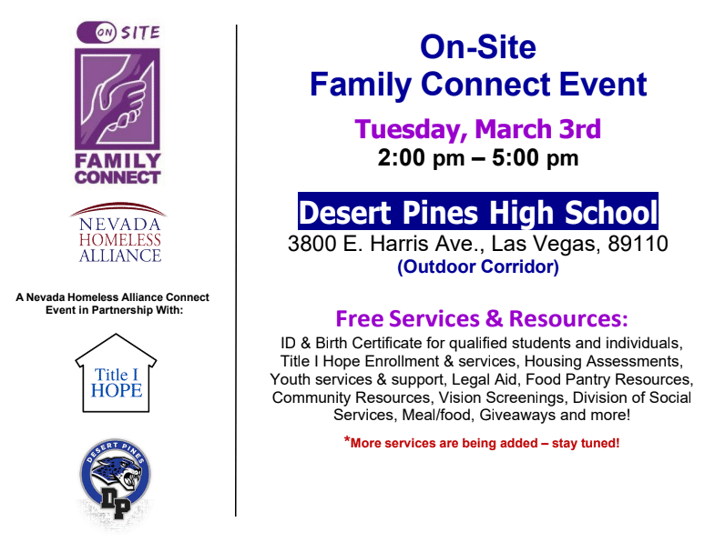
Southern Nevada Event!


Screenshot 2026-02-24 at 3.17.11 PM


Federal Reporting Updates

HUDlogo


Point-in-Time Count & Housing Inventory Count

First and foremost: thank you! To every staff, volunteer, and client that helped with the 2026 PIT Count, your dedication is the backbone that will help us end homelessness in our community.  


Action Required: Data Quality Phase

We have officially moved into the Data Quality phase for the Housing Inventory Count (HIC) and Point-in-Time (PIT) report. Our focus now shifts to Utilization Rates—ensuring that the number of people served on the night of the PIT matches the capacity of our HMIS programs. 

What this means for Agency Leads: If you manage Emergency Shelter, Transitional Housing, RRH, PSH, or OPH programs, please keep a close eye on your inbox. We are currently flagging programs with significantly HIGH or LOW utilization

If you receive a flag, we need your help to resolve it by:  

  • Providing a detailed explanation for the utilization discrepancy.
  • Updating Bed and Unit Inventory if your program capacity has changed.
  • Cleaning up client data, specifically ensuring all missing exit dates and housing move-in dates are recorded.


Questions?

Accurate data ensures our community receives the funding and resources it deserves. If you need a hand navigating these updates, please reach out directly to nevada-admin@bitfocus.com.


Continued 2025 System Performance Measures (SPM)

We are currently working on Data quality review for the final federal report that are required by HUD: System Performance Measures (SPM)

Throughout the next month you may receive emails regarding data quality in your program(s). These emails will be requesting a review and/or correction of specific data quality elements. For example, some agencies may need to review and correct missing Exit Destinations or add Annual Assessments.  


What Can Your Agency Do to Prepare for the SPM?

The Bitfocus team may reach out to verify or correct data about your program and/or clients. Please look out for those emails and respond promptly. We truly appreciate all of the hard work your community does to maintain data that is complete, accurate, and timely!  

You can review the data by doing the following: 

1. Run the [HUDX-225] HMIS Data Quality Report for the period 10/1/24 to 9/30/25 (you'll find this report in the Clarity Human Services Report Library under HUD Reports). Correct records with errors, paying special attention to any element that shows over a 5% error rate (remember, clicking on a number will give you a “drill down” list of clients being counted in that number). Want more information on what gets counted in this report? 

Check out our Help Center article: [HUDX-225] HMIS Data Quality Report


2. Run the [GNRL-106] Program Roster for the period 10/1/24 to 9/30/25 (this report is under Program Based Reports) and make sure household groups are correct (households are separated by bold lines. Clients not separated by lines are grouped together in a household). If clients are grouped together incorrectly, contact the Helpdesk to get them corrected. Some measures only count heads of household, so it's important that households be configured correctly!  

Check out our Help Center article: [GNRL-106] Program Roster 


3. Run the [GNRL-220] Program Details Report for the period 10/1/24 to 9/30/25 (this report is under Program Based Reports) and review the following:  

    • Date of Birth: Some measures only count adults, so it's important that dates of birth be as accurate as possible. 
    • Housing Move-in Date: Make sure this date is on or between the client’s project start and exit dates, otherwise it will look like clients were never housed by your project! 
    • Income and Non-Cash Benefits: Be sure these are/were updated before client exit and at annual assessments. Increase in income/benefits is one of the areas in which communities are measured. 
    • Living Situation (including prior residence and length of time homeless): Make sure these fields are as complete as possible with no "Client doesn’t know," "Client refused," or "Data not collected" values when possible. These elements impact measures around entries from homelessness. 
    • Exit Destination: Avoid choosing "Client doesn’t know," "Client Prefers not to Answer," or "Data not collected" values whenever possible. This element impacts measures around returns to homelessness. 
    • Review Bed Inventories and Utilization rates for accuracy. Ensure an accurate number of beds and units are listed throughout the year for your shelter and housing programs. Utilization rates should be between 90-105%. For Night-by-night (NbN) Shelters, please resolve any missing exits or abandoned enrollments. 

Check out our Help Center article: [GNRL-220] Program Details Report 


Thanks in advance for your help in making sure that our community’s data is as accurate as possible. 


Help Desk Reminders

Clarity Human Services logo small

1. Canned Report Issues  
When submitting tickets for Clarity Canned Reports, include: 

  • Report Name 
  • Parameters Used (Agency, program, date range, etc.) 

 2. PII Reminder: Use UID Only 
To maintain client confidentiality and data security: 

  • Use only the Clarity Unique Identifier (UID) in all communications (emails, tickets, chats). 
  • Block out all PII (names, SSN, DOB, etc.) from screenshots and files sent to us. 

3. Support Tip: New Ticket Per Issue 
We are continuing to see users replying to or reopening old tickets. To help us support you faster and more efficiently, please submit all new requests by sending a new email to nevada-admin@bitfocus.com.

❗Please do not reply to or reopen old tickets. Each request MUST be submitted as a new ticket so it can be properly tracked and assigned. 

The first three people to email "sunshine" to kellyr@bitfocus.com will win a prize. 


Thank you!

Another PIT is in the books

We’re so grateful to all Nevada CoCs for their participation in the Unsheltered Point-in-Time Count. Your hard work and partnership make a real difference! 


Upcoming Events

calendar-icon-navy

Statewide Office Hours | March 12th 12-1PM | Zoom Link

If you have a question or concern, pop in and ask! There is no planned curriculum; this is your time. 


Statewide Refresher Training (subject TBA) | March 26th from 1-2PM | Zoom Link

We are listening to your suggestions on what you want to see in your training! Vote here!


Bitfocus is Hiring

bitfocus Checkmark small


Join our Team!

  • Work with us at Bitfocus! Join a team committed to innovation, collaboration, and real-world impact in human services.  

Questions?

Your HMIS Administrators are happy to help.

Email: nevada-admin@bitfocus.com